
The treatment request reaches the wrong person
The treatment interest from the form is saved to the record and the lead is assigned automatically to the chosen sales agent.
At a dental clinic, a lead may start by asking for a price, send an X-ray or photo, and only be ready to book days later. Sodo CRM gathers all of these contacts on one patient card and gives the sales advisor and the clinic manager the same up-to-date view.
Patients ask through different channels, compare several treatments and often wait after receiving a price. When the team cannot see the history, every new contact starts from zero.
The treatment interest from the form is saved to the record and the lead is assigned automatically to the chosen sales agent.
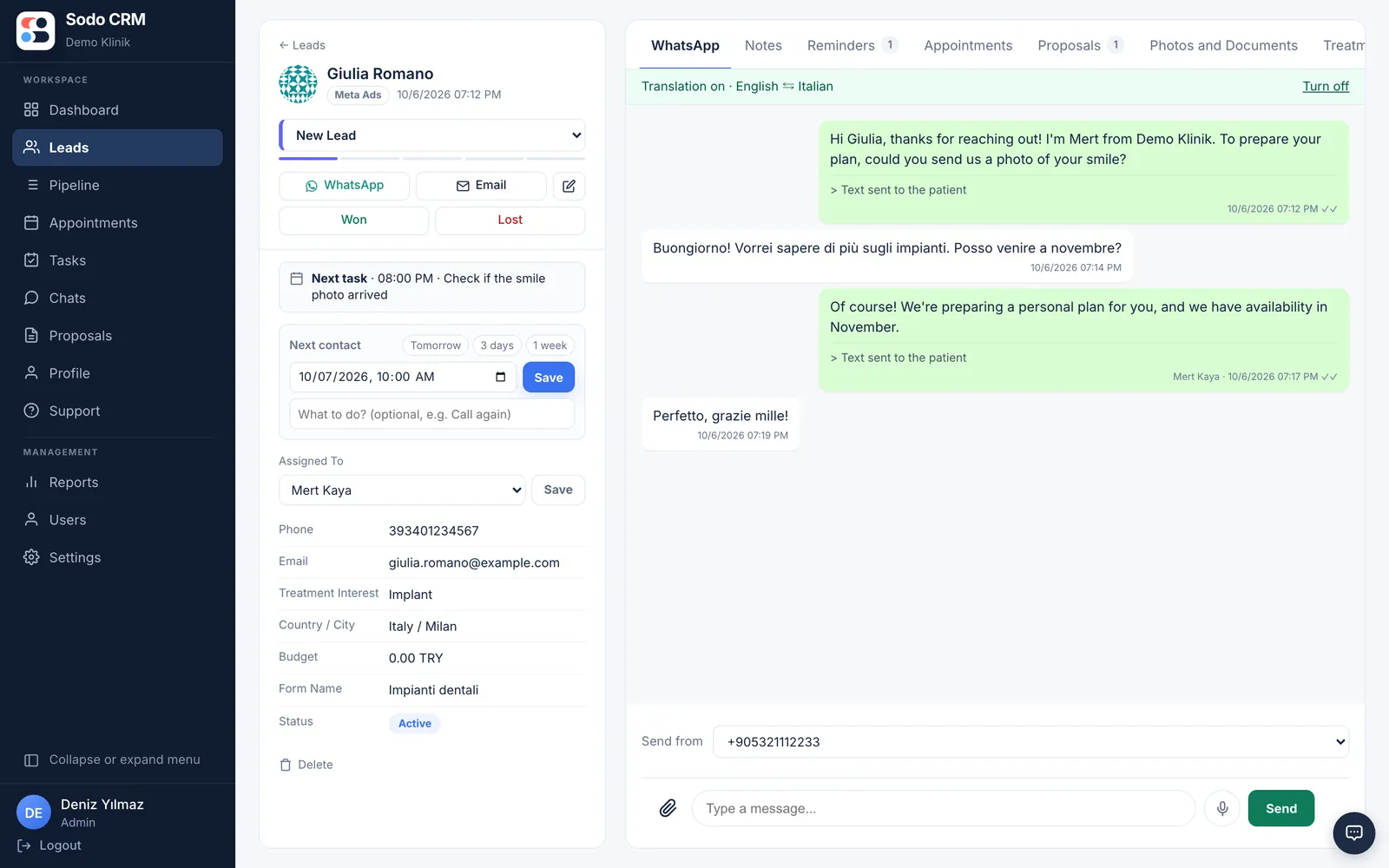
Patient photos, notes and the WhatsApp conversation come together on one authorised patient card.
A dated reminder is set after the quote; managers can see pending and overdue follow-ups.
An implant, veneer or cosmetic dentistry request from Meta or your web form is written to the patient card.
The lead is assigned automatically; a WhatsApp welcome is sent and later messages are kept in the CRM history.
Photo assessment, quote, call-back date and clinic appointment move forward in one process.
Arrange new enquiry, assessment, quote, appointment and outcome stages to match your clinic’s process.
Each advisor connects their own number; the conversation is visible to the manager together with the patient history.
Keep photos sent for pre-assessment with their notes; restrict direct file access by permission.
Record the appointment that comes out of the sales conversation and track it with the next step.
Create a task to call back the patient who needs time to decide, on the right day and at the right time.
See which treatment campaign turns into appointments and at which stage advisors lose patients.
When choosing a CRM for a dental clinic, an appointment calendar is not enough. You also need to know which treatment an ad enquiry was for, what was said on WhatsApp, which photos were reviewed and what happens after the quote. Sodo CRM makes this sales context available to the whole team.
See how the product fits the way your team already handles enquiries and sales.
A dental clinic CRM collects patient leads from ads, web forms and WhatsApp, assigns them to the responsible advisor and keeps the full sales history from the first conversation to the appointment outcome in one record.
Yes. The treatment interest from the form can be mapped to a CRM field. Leads can be filtered and reported by implant, veneers, smile design or any other treatment the clinic defines.
Yes. Photos can be uploaded to the patient card with notes. Unauthorised direct access is blocked; viewing is limited by role-based user permissions.
A reminder with a date, time, owner and note is added to the patient card. When it is due, the task appears on the user’s panel and the manager can check overdue follow-ups.